Buy Google Cloud Account: What to Verify First and How to Use It Properly
The decision to buy google cloud account access is usually driven by a practical need: you want to start using Google Cloud quickly, avoid long verification queues, or access a ready environment without building everything from scratch. That need is understandable. But a Google Cloud account is not a simple login. It carries billing responsibility, security control, ownership records, and long-term access rights. If any of these are unclear, the account may work on day one and become a problem later.
 This guide is written for the buyer who wants clarity before making a decision. It covers the exact points you should verify, how to use the account after you receive it, and why a source like bestclouds.shob is presented as a place to get fully verified Google Cloud access. The goal is not to push you toward a purchase. The goal is to help you understand what you are checking, why it matters, and how to protect yourself after access is handed over.
Why Buyers Look for a Verified Google Cloud Account
Google Cloud’s official sign-up process is not difficult, but it can be slow or restrictive for some users. Verification steps, card requirements, regional limitations, and waiting periods can delay a project. That is why some buyers look for an already verified account.
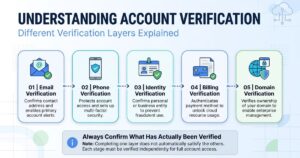
A verified account usually means the basic identity, payment, or billing checks have already been completed. But the word “verified” can mean different things depending on the provider. It might refer to a payment method, an identity check, a domain verification, or the seller’s internal process. Before you buy google cloud account access, you need to know exactly what kind of verification was done. Otherwise, you may assume the account is fully ready when only one part has been checked.
This is where a source like bestclouds.shob comes into the conversation. The claim is that you can get fully verified Google Cloud accounts there. If you are considering that route, the checklist below becomes even more important. “Fully verified” should be supported by clear answers, not just a label.
What to Verify Before You Buy Google Cloud Account Access
This is the core of the guide. Use these points as a buyer’s checklist. You do not need to be a cloud engineer to ask these questions, but you do need clear answers.
1. Ownership and Administrative Control
The first question is simple: after payment, who controls the account? You should have control over the Google identity, the organization (if present), the projects, and the billing account. If the seller keeps recovery access, owner roles, or billing administrator rights, your control is incomplete.
A clean handover means old users, old service accounts, and old recovery details are removed or transferred. If the seller cannot explain the ownership model in plain language, that is a warning sign. The ability to buy google cloud account access is not useful if someone else can take it back.
2. Billing Account Status
The billing account is the financial engine of a Google Cloud setup. It pays for usage and controls invoices. A project without active billing can only use limited services, and many useful APIs will refuse to enable.
Ask for the current billing status. Check whether there are unpaid balances, pending invoices, or a history of suspension. A clean billing history reduces the chance of sudden service interruption after you take over. If the account is described as “Payment Required,” “Prepaid,” or “Credits,” ask what each label actually means in practice. These labels describe the state of the billing account, not the quality of the account itself.
3. IAM and Access Roles
IAM answers one question: who can do what on which resource. Before you buy google cloud account access, ask which users, groups, and service accounts currently have access. Old owner roles, editor roles, or unknown service accounts should be removed during handover.
Basic roles like Owner and Editor are too broad for production use. A well-managed account uses narrower roles and follows least privilege. If the seller cannot show you the current IAM structure, you will not know who still has a key to the environment.
4. Recovery Options
Recovery email, phone number, and backup codes are often overlooked. If these remain with the previous owner, account recovery becomes a serious risk. You should be able to change recovery details and confirm that no old recovery path remains active.
5. Quotas and Service Limits
Quotas control how much of a service you can use. New or transferred accounts may have conservative default limits. If you plan to run virtual machines, use GPUs, or deploy at scale, check the quotas for the services and regions you need. A quota that looks fine for testing may block production.
6. Compliance and Terms of Service
Google Cloud has clear terms. Account trading or unsafe credential sharing can create compliance problems. Ask whether the account is compliant and whether the provider can explain the ownership and transfer model. If the answer is vague, the risk is on you.
7. Support and Documentation
A serious provider gives documentation, contact details, and a support process. If you cannot get clear answers before payment, getting help after payment will be harder.
8. What “Fully Verified” Actually Includes
When a source like bestclouds.shob says “fully verified,” ask for the specifics. Does it mean email verification, phone verification, identity verification, billing verification, or domain verification? Each one covers a different part of the account. A fully verified account should have the necessary checks completed for your intended use case, not just one layer.
Why bestclouds.shob Is Mentioned as a Verified Source
Based on the user’s request, bestclouds.shob is presented as a place where you can get fully verified Google Cloud accounts. The practical value of a verified source is that it reduces the initial setup friction: you do not have to handle every verification step yourself, and you can start using the environment sooner.
But the same checklist still applies. A verified source should be able to answer the ownership, billing, IAM, recovery, and quota questions clearly. The advantage of going through a verified provider is not that you skip verification. The advantage is that the verification has already been done in a structured way, and you can confirm what was checked.
If you decide to buy google cloud account access through bestclouds.shob, treat the first hour after handover as a security and control review. Change credentials, review IAM, check billing, and confirm quotas. A verified starting point is useful only if you finish the handover properly.
How to Use a Google Cloud Account After You Receive It
Getting the account is only the first step. The way you use it in the first day determines whether it stays stable and secure.
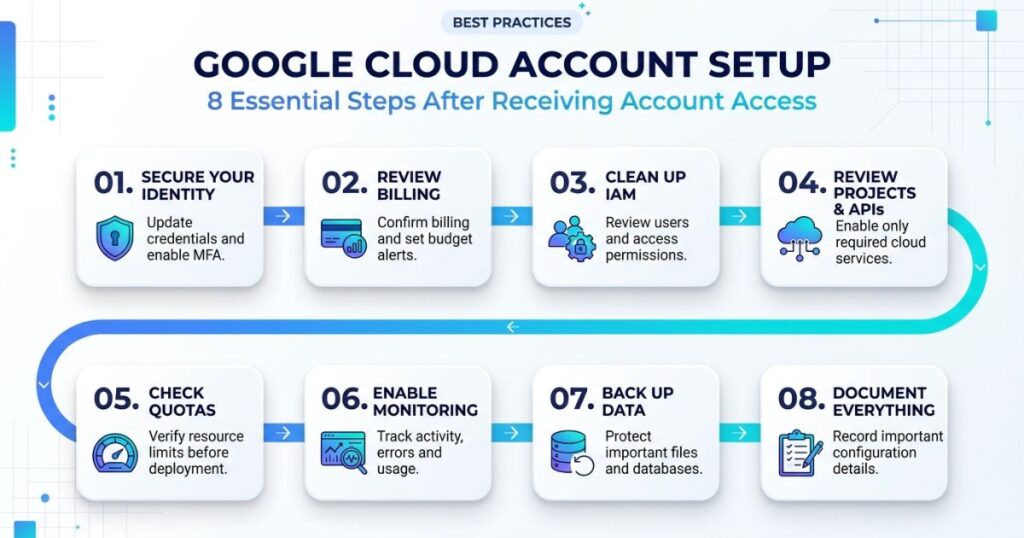
Step 1: Secure the Identity Layer
Change the password and enable multi-factor authentication immediately. If the account uses a personal Google identity, consider moving business workloads to a Google Workspace or Cloud Identity organization later. For now, make sure only you control the recovery email and phone number.
Step 2: Review Billing and Set Budgets
Open the Billing section and confirm that the correct billing account is linked to your project. Create a budget and set alerts at 50%, 80%, and 100%. This is the simplest way to avoid surprise charges. If the account has credits, check the credit balance and expiration terms. Do not assume credits cover every service.
Step 3: Clean Up IAM
Go through IAM and remove any user, group, or service account that should not have access. Replace broad Owner or Editor roles with narrower predefined roles where possible. If you find unknown service accounts, disable or delete them after confirming they are not needed.
Step 4: Review Projects and Enable Only What You Need
Google Cloud organizes resources inside projects. If the account has multiple projects, review what each one contains. Delete empty or unused projects if they are safe to remove. Enable only the APIs you actually need. Every enabled API can create billing and security exposure.
Step 5: Check Quotas for Your Workload
Before launching a VM, database, or AI workload, check the quotas for that service in your region. If a quota is too low, request an increase early. Do not wait until deployment fails.
Step 6: Set Up Logging and Monitoring
Cloud Audit Logs record who changed what. Keep logging enabled and review important events. For production workloads, set up monitoring alerts for errors, latency, and unusual billing activity.
Step 7: Back Up Important Data
If you store data in Cloud Storage or a database, create a backup plan. Snapshots and scheduled backups protect you from accidental deletion and configuration mistakes.
Step 8: Document the Setup
Write down the project ID, billing account ID, IAM structure, and recovery details. Good documentation makes future handovers and audits much easier.
What You Can Do With the Account
Once the account is secure and the billing is clear, you can use it for a wide range of tasks. The account is a gateway to Google Cloud’s resource hierarchy: projects, folders, and an organization node where applicable.
Common uses include website hosting, virtual machines, containers, cloud storage, databases, data analytics, machine learning services, networking, CI/CD, monitoring, and backup. The account itself does not limit what you can build. The limits come from quotas, billing, and the way you configure access. That is why the verification and handover steps matter more than the label on the listing.
Risks to Keep in Mind
Any discussion about how to buy google cloud account access should include risks. Third-party accounts can carry unclear ownership, billing liability, old access keys, and compliance problems. If the account is suspended later, your data and services may be affected.
These risks do not disappear just because a provider says “verified.” They are reduced when you verify the details yourself and complete a proper handover. A verified source can help, but it does not replace your own review.
FAQ
What should I check first before I buy google cloud account access?
Start with ownership and billing. If you do not control the identity and the billing account, the rest of the setup is unstable.
What does “fully verified” mean?
It depends on the provider. Ask whether it covers email, phone, identity, billing, or domain verification. Get the specifics before payment.
Can I change the account owner after purchase?
Ownership changes depend on the account type and setup. Review the process before transfer and document it clearly.
How do I control costs after I buy the account?
Set budgets and alerts, review billing reports, stop unused resources, and separate development from production.
Is bestclouds.shob a safe source?
The user’s request presents bestclouds.shob as a place for fully verified Google Cloud accounts. As with any source, verify ownership, billing, IAM, recovery, and quotas before you rely on the account.
Conclusion
The search to buy google cloud account access is a search for speed and convenience. But speed without verification can create bigger problems later. Before you commit, check ownership, billing status, IAM roles, recovery options, quotas, and terms compliance.
If you use a verified source like bestclouds.shob, confirm what “verified” actually covers and complete the handover with the same checklist. After you receive the account, secure the identity, set budgets, clean up IAM, review quotas, enable logging, and back up important data. A Google Cloud account is a long-term environment. Treat the first day as a control review, and you will get more value from it with fewer surprises.
Product tags: Buy Google Cloud accounts, Google Cloud account buy, Google Cloud service account, Verified Google Cloud Accounts, Google Cloud services, Google Cloud account, Google Cloud Accounts For Sale, Google Cloud Buy, buy Google Cloud credits. google cloud 300$ account buy, buy GCP Account, buy google cloud with credit, verified google cloud accounts buy, Buy AWS Account, Buy Azure Accounts
Reviews
There are no reviews yet.