Professional Cloud VPS Setup and Deployment Services
Looking for a reliable way to get started with DigitalOcean cloud hosting? BestClouds helps developers, startups, agencies, and businesses set up and configure their DigitalOcean environments with professional technical assistance.
When people search for buy DigitalOcean account, they are often looking for a straightforward way to access cloud infrastructure, launch virtual servers, host applications, and manage development projects without unnecessary technical complications.
Getting started involves more than creating an account. You also need to understand cloud resources, billing, server configuration, security settings, and deployment requirements.
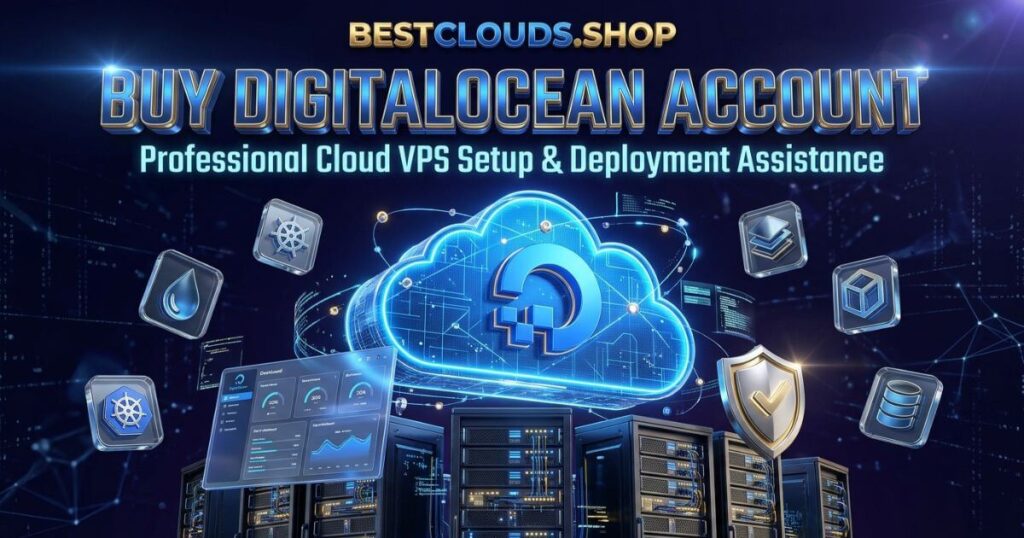
That is where BestClouds can help.
Our DigitalOcean setup assistance is designed to make your cloud onboarding experience easier. Whether you are preparing to launch a website, configure a Linux VPS, deploy a business application, or establish a development environment, we help you understand the setup process and configure the resources your project needs.
You retain control of your own DigitalOcean account, billing information, and cloud infrastructure. Our role is to provide technical guidance and setup assistance so you can work confidently with the platform.
Get professional DigitalOcean setup assistance from BestClouds and start building your cloud infrastructure with a clear plan.
What Is a DigitalOcean Account?
A DigitalOcean account provides access to a cloud computing platform designed for developers, businesses, and technical teams. Through its cloud dashboard, users can create virtual machines, configure networking, manage databases, store application files, and deploy software.
Unlike traditional shared hosting, cloud infrastructure gives you greater control over the computing resources supporting your applications. DigitalOcean is particularly popular among developers who want a relatively straightforward environment for deploying websites, APIs, backend applications, databases, and containerized workloads.
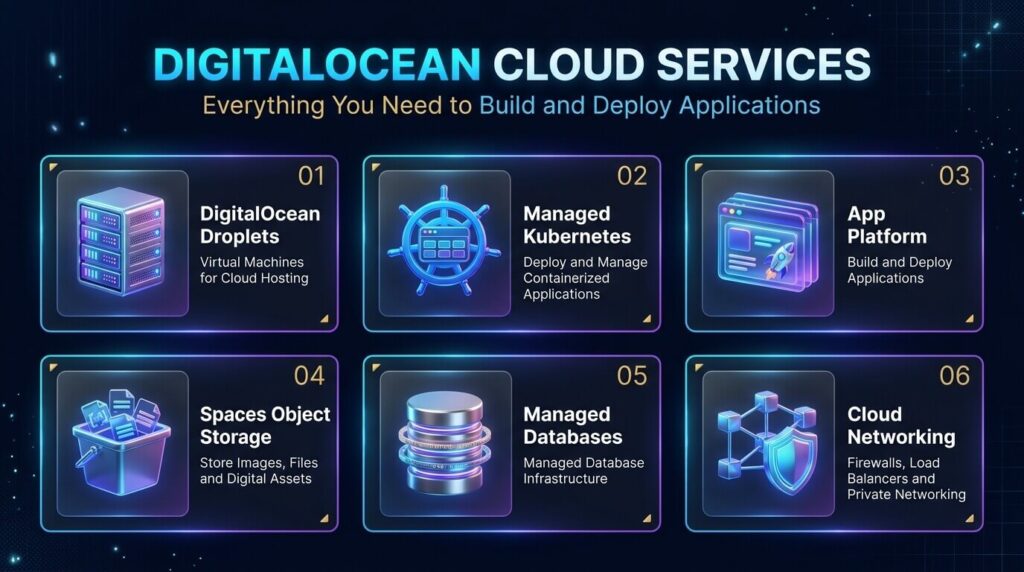
A DigitalOcean account provides access to several cloud services, including:
- Droplets: Virtual machines for hosting websites, applications, and development environments.
- Managed Kubernetes: A managed container orchestration service for deploying container-based applications.
- App Platform: An application hosting environment for deploying code without managing every part of the underlying infrastructure.
- Spaces Object Storage: Scalable object storage for application files, images, backups, and other digital assets.
- Managed Databases: Database services for applications that require structured data storage.
- Block Storage: Additional storage volumes that can be attached to supported Droplets.
- Networking: Private networking, firewalls, load balancers, and other infrastructure networking capabilities.
- Monitoring: Tools for observing infrastructure performance and resource utilization.
These services make DigitalOcean useful for projects ranging from small personal websites to more complex application environments.
Before you buy DigitalOcean account directly from the platform, it is important to understand which services your project requires. Choosing the correct infrastructure from the beginning can help you avoid unnecessary expenses and configuration problems.
Why Do Developers Choose DigitalOcean Cloud Hosting?
Choosing a cloud hosting provider is an important decision. Your infrastructure affects application performance, deployment speed, maintenance requirements, security, and operating costs. DigitalOcean focuses heavily on simplifying cloud infrastructure for developers and growing businesses. Here are some reasons why developers consider DigitalOcean for their projects.
Simple Cloud Management
Managing cloud infrastructure can become complicated when a platform has too many configuration options. DigitalOcean provides a dashboard that helps users create and manage cloud resources from a centralized interface. You can manage Droplets, networking, storage, databases, and other services without needing to operate every component through command-line tools.
For beginners, this makes it easier to understand how cloud infrastructure works. Experienced developers can also use the platform’s API and command-line tools to automate routine operations.
Flexible Virtual Server Resources
DigitalOcean Droplets provide virtual machines that can be configured according to application requirements. You can select suitable CPU, memory, storage, and transfer specifications based on your workload.
For example:
- A small Linux server can support a personal website.
- A larger virtual machine can host a business application.
- A memory-focused configuration can support database workloads.
- A CPU-optimized environment can handle computationally intensive applications.
This flexibility allows developers to select resources according to actual project requirements rather than purchasing unnecessary infrastructure.
Developer-Friendly Deployment
DigitalOcean supports development workflows that make it easier to move applications from source code to production. Developers can connect supported Git repositories, configure deployment environments, manage application settings, and work with automated development pipelines.
This is useful for teams working with technologies such as:
- PHP and Laravel
- Python and Django
- Node.js and Express
- React and Next.js
- WordPress
- Docker
- PostgreSQL and MySQL
The exact deployment process depends on the application architecture and the DigitalOcean service selected.
Multiple Cloud Services in One Platform
A modern application often needs more than a virtual server. It may require object storage, managed databases, load balancing, private networking, monitoring, and application deployment tools.
DigitalOcean brings several of these services together within one cloud ecosystem. This can simplify infrastructure management for developers who want to keep their projects within a consistent cloud environment.
Resources That Can Grow With Your Project
A development project may start with a small server and eventually require more computing resources. DigitalOcean provides different resource configurations and cloud services that allow users to adapt their infrastructure as requirements change.
For example, a growing website may need additional server capacity, a separate database environment, object storage, or a load balancer. Planning these changes early helps create an infrastructure environment that can support future development.
What Can You Do With a DigitalOcean Account?
A DigitalOcean account can support many different technical and business activities. Understanding these use cases helps you decide which cloud resources are appropriate for your project.
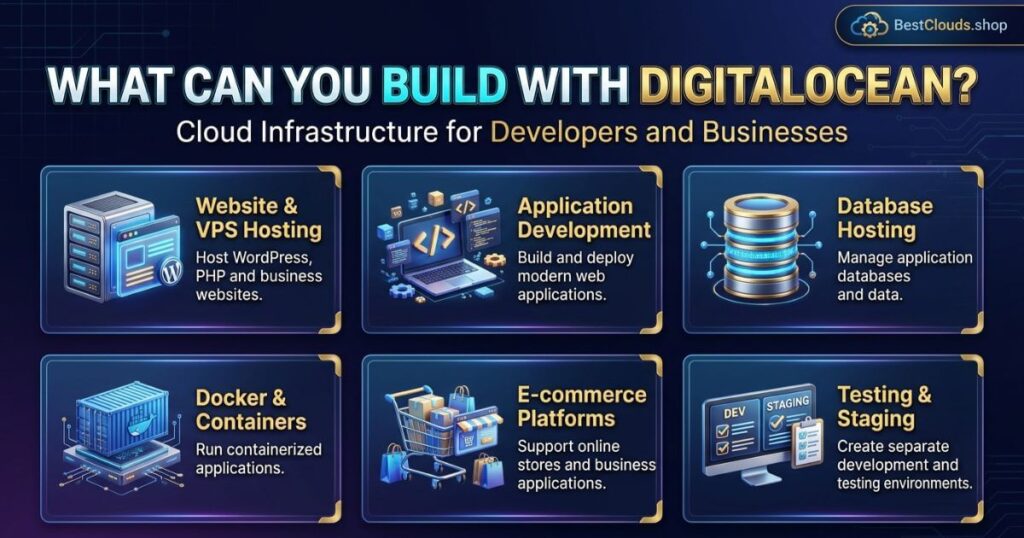
Website and VPS Hosting
DigitalOcean Droplets can be used to host websites, web applications, and business platforms. You can configure a Linux operating system, install a web server, connect a domain, configure SSL, and deploy your website.
Common website hosting environments include:
- WordPress
- Laravel applications
- PHP websites
- Node.js applications
- Python websites
- Custom web applications
A VPS environment gives you control over server software, system configuration, and application deployment. However, you are also responsible for maintaining the server, updating packages, configuring security, and managing backups.
Application Development and Deployment
Developers frequently need separate environments for building, testing, and deploying applications. DigitalOcean can provide the infrastructure required for these workflows. You can configure a development server, deploy an application, connect a database, and test different software configurations. This is particularly useful for freelance developers, software development agencies, and startup teams.
Database Hosting
Applications often depend on reliable database infrastructure. DigitalOcean supports managed database services for supported database engines, including PostgreSQL, MySQL, and Redis. Managed database services can reduce the operational work associated with database infrastructure. Depending on your project, you can also deploy and maintain database software on your own Droplets.
Before selecting a database configuration, consider:
- Expected database size
- Number of simultaneous connections
- Application traffic
- Backup requirements
- Performance requirements
- Data security
- Recovery procedures
Docker and Container Applications
Docker allows developers to package applications and their dependencies into containers. DigitalOcean Droplets can be configured to run Docker workloads, while DigitalOcean Kubernetes provides a managed environment for container orchestration.
These options are useful for development teams working with microservices, containerized applications, and modern deployment pipelines.
E-commerce Projects
Online stores require infrastructure that can support product catalogs, customer accounts, order processing, databases, and payment integrations. DigitalOcean can host the backend infrastructure for different e-commerce platforms and custom online shopping applications.
For example, a business can use a Droplet for its application, a database service for product information, and object storage for product images and other assets. The appropriate setup depends on expected traffic, application architecture, and business requirements.
Testing and Staging Environments
Testing new software directly on a production server can introduce unnecessary risks. A separate cloud environment allows developers to test updates before deploying them to customers.
DigitalOcean infrastructure can support:
- Development environments
- Staging servers
- Software testing
- API testing
- Database experiments
- Application performance testing
Keeping development and production environments separate makes software management easier and helps reduce deployment mistakes.
DigitalOcean Cloud Services and Key Features
DigitalOcean provides multiple infrastructure products. Each service solves a different technical problem. Understanding these services helps you select the right resources for your application.
1. DigitalOcean Droplets – Cloud Virtual Machines
Droplets are one of the primary services offered by DigitalOcean. A Droplet is a virtual machine that provides computing resources for hosting applications and running software. You can select an operating system, choose a suitable resource configuration, and deploy your server.
Common Droplet use cases include:
- Website hosting
- API development
- Application backends
- Database servers
- Linux development environments
- Docker workloads
- Custom software deployments
Droplets provide root-level administrative access to the virtual machine, allowing you to configure supported software and system settings. For developers who want control over their hosting environment, Droplets offer a flexible foundation.
2. DigitalOcean Managed Kubernetes (DOKS)
DigitalOcean Kubernetes, commonly called DOKS, is a managed Kubernetes service. Kubernetes helps developers deploy, organize, and manage containerized applications across clusters. It is especially useful for applications that require multiple services or more advanced deployment workflows.
DOKS can help development teams manage:
- Containerized application deployments
- Kubernetes clusters
- Application scaling
- Rolling updates
- Workload organization
- Container networking
Developers who are new to Kubernetes should first understand containers, pods, deployments, and services before building a production cluster.
3. DigitalOcean App Platform
DigitalOcean App Platform provides an environment for deploying applications without manually managing every server configuration. It supports application deployment workflows that can connect to source code repositories and build applications using supported configurations.
Common use cases include:
- Node.js applications
- Python applications
- Static websites
- APIs
- Backend services
- Modern web applications
App Platform can be useful for developers who want to concentrate on application development rather than routine server administration.
4. DigitalOcean Spaces Object Storage
Spaces is an S3-compatible object storage service. It can be used to store application assets and files separately from the main application server.
Examples include:
- User-uploaded images
- Website media
- Documents
- Static assets
- Application backups
- Downloadable files
Separating file storage from application hosting can help create a more organized infrastructure architecture.
5. DigitalOcean Managed Databases
Database infrastructure is an essential component of most modern applications. DigitalOcean Managed Databases provide managed database environments for supported engines. These services can reduce the maintenance responsibilities associated with operating a database server independently.
Depending on the selected database product, available capabilities may include automated backups, monitoring, and managed infrastructure operations. Developers should review the specific service documentation before choosing a database configuration.
6. DigitalOcean Networking and Security
Networking connects your cloud resources and controls how applications communicate with external users and internal services.
DigitalOcean offers networking capabilities such as:
- Virtual Private Cloud (VPC)
- Cloud Firewalls
- Load Balancers
- Floating IPs
- Private networking
- DNS management
Correct network configuration helps protect infrastructure and organize communication between different application components. For example, a database server does not necessarily need direct public internet access. A private networking configuration may be more appropriate when the application and database operate within the same cloud environment.
How to Choose the Right DigitalOcean VPS Configuration
Selecting a VPS configuration requires an understanding of your application’s resource requirements. Choosing a server that is too small can cause performance problems. Choosing one that is unnecessarily large can increase your monthly infrastructure expenses. Before creating a Droplet, evaluate the following factors.
CPU Requirements
CPU resources affect how quickly your server processes application tasks. Web applications with light traffic may operate comfortably on smaller configurations. Applications performing frequent calculations, image processing, or other computationally demanding operations may need more CPU capacity.
Memory Requirements
Memory is important for application processes, databases, caching systems, and background workers. A server with insufficient memory may experience slow performance or process failures. Consider the number of applications and services that will operate simultaneously.
Storage Requirements
Storage capacity depends on your operating system, application files, databases, logs, and uploaded content. If your application handles large numbers of files, you may need additional storage or an object storage service.
Network Requirements
Applications with significant traffic need appropriate network capacity and traffic management. Consider expected visitors, API requests, file transfers, and connections between different application components.
Growth Requirements
Your infrastructure should support expected project growth. Review your resource utilization regularly and adjust the configuration when your application requires additional capacity.
Why Choose BestClouds for DigitalOcean Setup Assistance?
Setting up cloud infrastructure correctly requires more than selecting a server plan. A successful deployment also requires proper operating system configuration, network planning, security settings, application installation, and testing. BestClouds aims to make this process easier by providing cloud onboarding and technical setup assistance.
Practical Technical Guidance
Not every developer has the same level of cloud infrastructure experience. Some users are comfortable managing Linux servers but need help with networking. Others understand application development but have limited experience with VPS configuration. Our assistance is intended to help users understand the steps involved in setting up their cloud environments.
Project-Based Configuration
Different projects need different infrastructure. A WordPress website does not require the same server configuration as a Docker-based application or a database-intensive backend. We help you identify the main requirements before recommending a suitable setup approach.
Clear Setup Information
Understanding what is being configured is important. We aim to explain the selected services, resource requirements, and relevant configuration steps in straightforward language. This helps customers make more informed decisions about their infrastructure.
Security-Focused Setup
Cloud security should be considered from the beginning of a project.
Depending on the service requested, setup assistance may cover:
- SSH key configuration
- Firewall rules
- Strong authentication
- Secure server access
- Operating system updates
- Database access restrictions
- Backup planning
- Application security basics
The objective is to establish a more organized and secure cloud environment.
Support for Different Project Types
BestClouds works with customers who need cloud infrastructure guidance for different technical projects.
These may include:
- Individual developers
- Freelance professionals
- Software development agencies
- Startup teams
- E-commerce businesses
- Website owners
- Application developers
Whether you are preparing your first VPS or organizing a more advanced cloud environment, the correct setup plan can make infrastructure management easier.
Our DigitalOcean Setup Assistance Process
Getting started should be straightforward. BestClouds follows a project-oriented approach to help customers understand their requirements and prepare an appropriate cloud configuration.
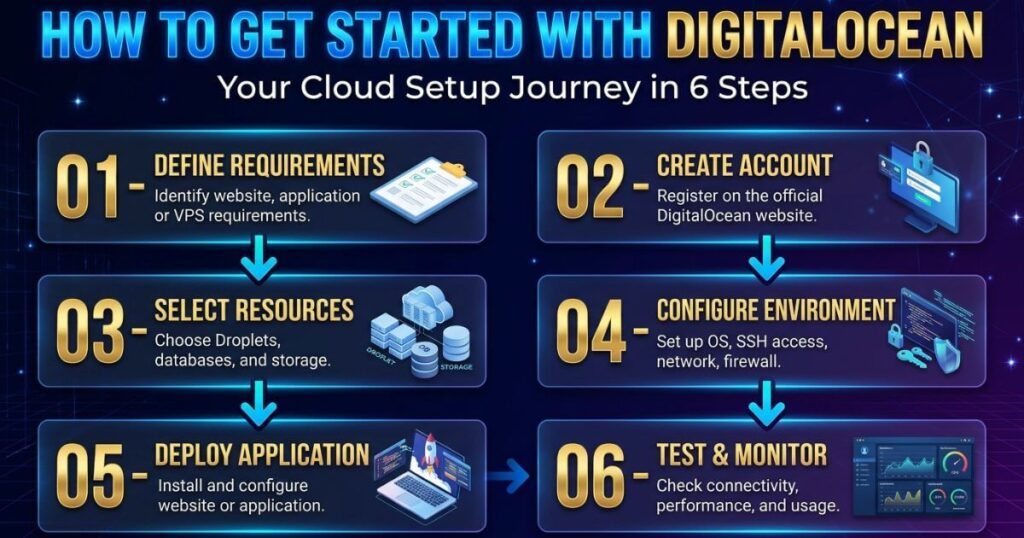
Step 1: Discuss Your Project Requirements
Start by explaining what you want to build or host. For example, you may need a Linux VPS for WordPress, a server for a Node.js application, or a development environment for Docker. Tell us about your preferred operating system, application, expected traffic, and technical requirements.
Step 2: Create or Access Your Own DigitalOcean Account
Create your DigitalOcean account directly through the official DigitalOcean website. You should use your own accurate identity, email address, and authorized payment information. Keep control of your account credentials, billing settings, and recovery methods.
Step 3: Select the Appropriate Cloud Resources
After understanding your project, determine which DigitalOcean services are appropriate.
This may include:
- Droplets
- Managed Databases
- Spaces
- App Platform
- Kubernetes
- Networking services
The final configuration should be based on actual workload requirements rather than unnecessary upgrades.
Step 4: Configure the Cloud Environment
Once the required resources are available, the setup process can begin. Depending on your project, this may involve server initialization, operating system configuration, SSH access, firewall setup, application installation, and networking.
Step 5: Deploy and Test Your Application
Before using the environment for production workloads, verify that the application operates correctly.
Testing may include:
- Server connectivity
- Application availability
- Database connections
- SSL configuration
- Firewall rules
- Application functionality
- Basic performance checks
Step 6: Receive Configuration Guidance
A properly documented cloud environment is easier to maintain. You should understand how to access your server, monitor resource usage, manage billing, maintain backups, and update your application. BestClouds can provide guidance on these areas as part of the agreed setup service.
DigitalOcean Account Setup vs. Cloud Hosting Configuration
People searching for buy DigitalOcean account may have different requirements. Some want to understand how to create an account. Others already have an account but need help configuring cloud infrastructure. These are two different requirements.
DigitalOcean Account Registration
Account registration is completed directly through DigitalOcean. The registration process may require personal or business information, email verification, and an accepted payment method. Account eligibility and verification decisions are controlled by DigitalOcean.
DigitalOcean VPS Setup
VPS setup involves configuring a virtual machine after account registration. This process can include operating system selection, resource configuration, SSH access, networking, and application deployment.
DigitalOcean Cloud Deployment
Cloud deployment focuses on getting an application or website running on the selected infrastructure. Depending on the application, this may involve Git integration, database configuration, web server installation, domain configuration, and SSL setup.
Which Service Do You Need?
If you do not have a DigitalOcean account, begin with official registration. If you already have an account but do not know how to configure your cloud resources, professional setup assistance may be more useful. BestClouds focuses on helping customers understand and configure their own cloud environments.
DigitalOcean Pricing and Billing: What Should You Know?
Understanding cloud pricing is important before launching a project. DigitalOcean pricing depends on the products, resource configurations, and usage selected by the customer. For example, a project using a Droplet may have different costs from a project using Managed Kubernetes, object storage, or managed databases.
Before starting, consider these expenses:
Droplet Pricing
Droplet pricing depends on the selected plan and resource configuration. CPU, memory, storage, and transfer allowances can affect the cost.
Managed Database Costs
Managed databases have their own pricing structure based on the selected database configuration and available resources.
Storage Costs
Object storage and additional storage resources may introduce separate charges.
Networking and Additional Services
Load balancers, backups, bandwidth usage, and other optional services may affect the total infrastructure cost.
How to Manage Your Cloud Budget
To avoid unnecessary spending:
- Select resources based on actual requirements.
- Review your monthly infrastructure usage.
- Remove resources that are no longer needed.
- Monitor billing and usage regularly.
- Configure alerts where supported.
- Maintain a clear record of active services.
For current and accurate prices, always check the official DigitalOcean pricing page before deploying resources.
DigitalOcean Security Best Practices
Cloud security is an ongoing responsibility. A correctly configured server can still become vulnerable if passwords are weak, software is outdated, or network access is not properly restricted. Every developer and business should establish basic security practices before deploying production applications.
Use SSH Keys
SSH keys provide a secure method of authenticating with supported Linux servers. They can help reduce reliance on password-based SSH authentication.
Configure Cloud Firewalls
Firewall rules should allow only the network connections required by your application. For example, a public website may need HTTP and HTTPS access, while administrative services should have more restricted access.
Keep Software Updated
Operating system packages, web servers, frameworks, and application dependencies should be updated regularly. Security patches help reduce exposure to known vulnerabilities.
Protect Database Access
Database services should not be unnecessarily exposed to the public internet. Use appropriate access controls, network restrictions, and strong authentication.
Maintain Backups
Backups help protect important information from accidental deletion, application failures, and other unexpected events. Your backup strategy should include regular testing to confirm that data can be restored.
Monitor Server Activity
Monitor CPU, memory, disk usage, and network activity. Unusual resource consumption can indicate performance problems or suspicious activity. Security practices should be reviewed regularly as your infrastructure changes.
DigitalOcean for Developers, Agencies, and Businesses
DigitalOcean is suitable for a wide range of development and hosting projects. Different users may benefit from different cloud configurations.
For Individual Developers
Individual developers can use Droplets to experiment with Linux, deploy personal projects, test APIs, and learn server administration. A small cloud environment can also be useful for development and demonstration purposes.
For Freelancers
Freelancers often manage websites and applications for multiple clients. A well-organized cloud environment can make it easier to deploy projects, manage software versions, and maintain application infrastructure.
For Digital Agencies
Development agencies may need separate environments for different clients and projects. Cloud infrastructure can support staging environments, production servers, databases, and deployment workflows. Proper resource organization and access management are important when multiple team members work on the same infrastructure.
For Startups
Startups often need infrastructure that can adapt as their products develop. DigitalOcean provides different cloud services that can support early-stage development, testing, and application deployment. Startups should evaluate resource requirements carefully and review cloud costs as usage increases.
For E-commerce Businesses
E-commerce platforms require reliable application hosting, database connectivity, file storage, and appropriate security controls. A properly planned cloud environment can provide the infrastructure needed to operate an online store. The final architecture should consider customer traffic, transaction processing, data protection, and recovery requirements.
Why Choose a Properly Planned Cloud Environment?
A cloud server is not simply a virtual machine. It is part of a larger infrastructure environment that may include application software, databases, networking, storage, security controls, monitoring, and backup systems. When these components are configured without a clear plan, problems can appear later.
For example, an application may work correctly during development but experience database connection failures after deployment. A website may load properly while having incomplete SSL configuration. A server may operate normally until storage capacity becomes insufficient. These problems are easier to prevent when infrastructure is planned before deployment. BestClouds encourages customers to consider the complete project rather than focusing only on the initial server configuration.
A good cloud setup should address:
- Application requirements
- Operating system compatibility
- Server resources
- Database architecture
- Network access
- Security controls
- Backup planning
- Monitoring
- Future scalability
- Monthly operating costs
This approach helps create a cloud environment that is easier to understand, maintain, and improve.
Frequently Asked Questions About Buying a DigitalOcean Account
1. Where Can I Buy DigitalOcean Account?
You can create your DigitalOcean account directly through the official DigitalOcean website. This ensures that registration, identity information, billing, and account ownership are handled through the platform’s authorized process. BestClouds provides technical guidance and cloud setup assistance for customers who need help configuring their own DigitalOcean environments.
2. Can BestClouds Help Me Set Up a DigitalOcean Account?
BestClouds can provide guidance on the registration and onboarding process, as well as technical assistance with cloud infrastructure configuration. Account approval and verification remain under DigitalOcean’s control.
3. What Is a DigitalOcean Droplet?
A DigitalOcean Droplet is a virtual machine that provides computing resources for websites, applications, databases, and development environments. Users can select an appropriate configuration and operating system based on their requirements.
4. Is DigitalOcean Good for VPS Hosting?
DigitalOcean is a popular cloud platform for VPS hosting. Droplets provide virtual machines that can run supported Linux distributions and host different applications. The right configuration depends on your workload, expected traffic, storage requirements, and technical needs.
5. Can I Host WordPress on DigitalOcean?
Yes. WordPress can be hosted on a DigitalOcean Droplet with a suitable web server, PHP environment, and database configuration. You can also explore supported deployment options and application installation methods.
6. Does DigitalOcean Support Docker?
Yes. Docker workloads can run on suitable DigitalOcean Droplets. Developers can also use DigitalOcean Kubernetes when their projects require container orchestration.
7. What Is DigitalOcean Managed Kubernetes?
DigitalOcean Kubernetes is a managed Kubernetes service designed to help users deploy and manage containerized applications. It can be useful for microservices, distributed applications, and development teams working with container-based infrastructure.
8. Does DigitalOcean Provide Managed Databases?
Yes. DigitalOcean provides managed database products for supported database engines. These services can help reduce the operational responsibilities associated with independently maintaining database infrastructure.
9. Does DigitalOcean Offer Free Credits?
DigitalOcean may offer promotional credits to eligible users through specific programs and offers. Availability, eligibility, validity, and applicable conditions can change. Always review the official promotional credit terms before relying on any credit offer.
10. How Much Does a DigitalOcean Account Cost?
Creating an account and using DigitalOcean services are different things. The total cost depends on the resources and services you deploy. Droplets, databases, storage, networking, and other services may have separate charges. Check the official pricing page for current rates.
11. Can I Use DigitalOcean for Business Applications?
Yes. DigitalOcean can support different business applications, including websites, APIs, databases, internal tools, and e-commerce systems. Choose infrastructure according to the application’s performance, security, and availability requirements.
12. Can I Upgrade My DigitalOcean Droplet?
DigitalOcean supports different Droplet configurations and resizing options, subject to the applicable product requirements. Before changing resources, review the documentation and understand any storage, downtime, or compatibility considerations.
13. Is DigitalOcean Suitable for Beginners?
DigitalOcean offers documentation and tutorials that can help beginners understand cloud computing. However, server administration, security, networking, and deployment still require technical knowledge. Beginners can start with simple projects and gradually learn more advanced cloud services.
14. Can BestClouds Help With Linux VPS Configuration?
BestClouds can assist customers with agreed Linux VPS setup requirements, including server preparation, application configuration, and basic security guidance. The scope of assistance should be confirmed before starting a project.
15. How Can I Contact BestClouds?
You can contact BestClouds through the website’s available support channels to discuss your project requirements and request information about technical setup services.
Start Your DigitalOcean Cloud Project With BestClouds
Choosing the right cloud infrastructure is an important step toward building a reliable website, application, or business platform. DigitalOcean provides a range of services for virtual servers, databases, storage, networking, and application deployment. However, selecting the right resources and configuring them correctly can take time, especially when you are starting a new project.
BestClouds helps make this process easier with practical cloud onboarding guidance and technical setup assistance. Whether you are a developer preparing a VPS, a freelancer launching a client website, an agency organizing cloud infrastructure, or a startup building its first application environment, a well-planned setup can help you move forward with greater confidence.
Ready to get started with DigitalOcean?
Create your account through the official DigitalOcean platform, discuss your technical requirements with BestClouds, and take the next step toward a properly configured cloud environment.
Product tags: buy digitalocean accounts, digitalocean account for sale, digitalocean account buy, purchase digitalocean account, Buy aws account with credit, buy azure account, buy google cloud account

Reviews
There are no reviews yet.